A customer fills out your website form. They see a thank you message. Your team assumes the inquiry is in the CRM. Hours later, someone finds it in an inbox, without an owner or a clear next step.
A form can work perfectly while the handoff fails. Website CRM integration connects a valid inquiry to the right record, the right person and a trackable follow up process. Sending an email notification alone does not establish that those steps happened.
This guide focuses on that handoff: what to connect, how to prevent duplicate records, how to recover failures, and what to ask when hiring someone to build it. The goal is not to automate the relationship. It is to give a person a reliable starting point.
Define what a successful handoff actually means
Start with a statement you can verify: every accepted inquiry has a durable submission record, a recorded CRM outcome, an assigned owner or visible exception, and a next action. A popup saying “sent” cannot prove all of that.
Different systems may complete those steps at different times. Your website should not tell a visitor that a CRM assignment is complete if it has only accepted the form. Decide which acknowledgement the visitor receives and what your team sees while delivery is pending.
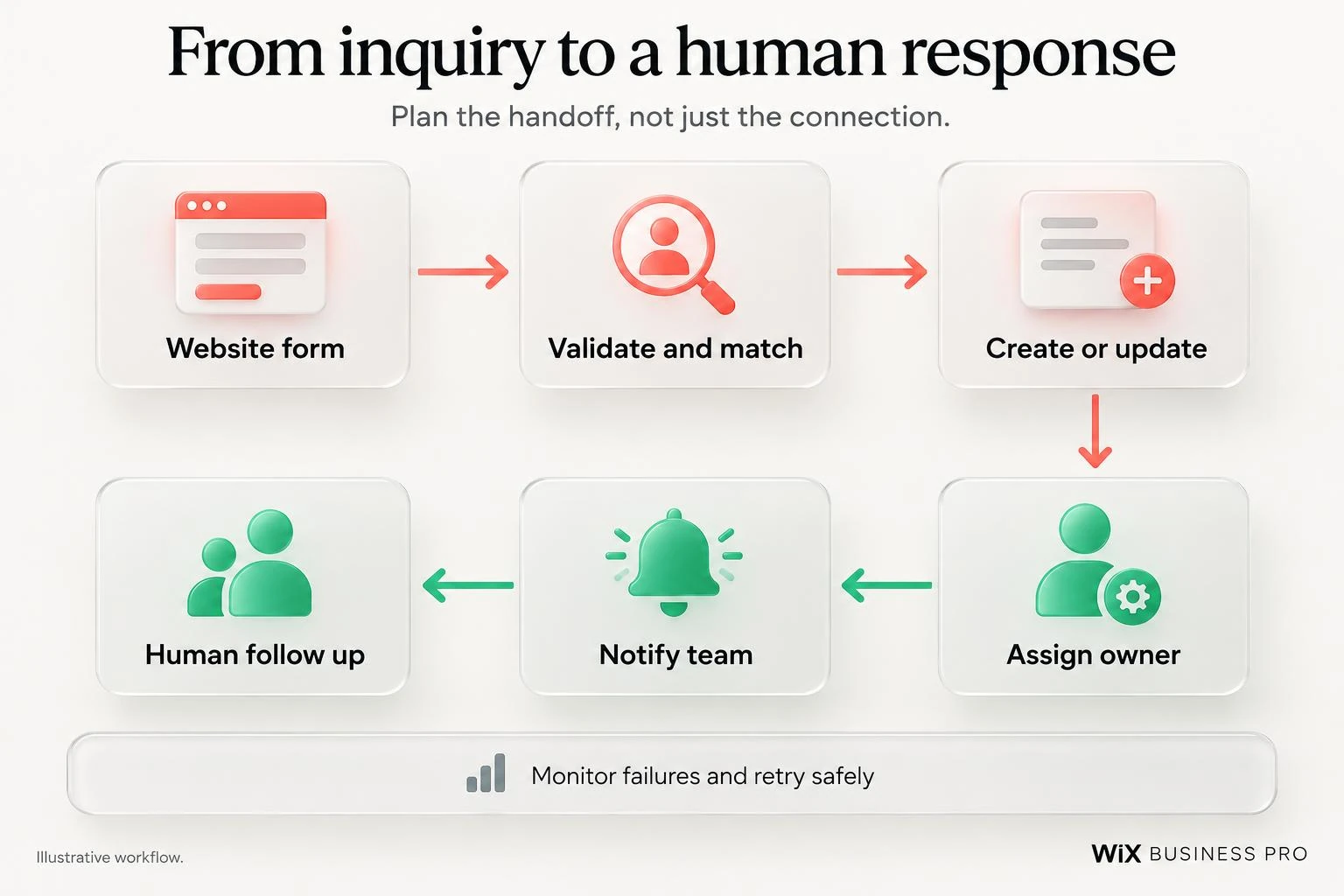
Build the chain, not just the connection
Validate the submission
Check required fields on the server as well as in the browser. Set sensible length limits, reject malformed input and apply spam controls appropriate to the form. A blocked bot submission should not become a sales task.
Keep the inquiry form proportionate. A phone number may help some workflows, but requiring it without a reason can make a simple question unnecessarily difficult. Collect what your team needs to respond, not everything a CRM could store.
Create or update the right CRM record
A returning customer may submit several inquiries. That should not automatically create several people. Decide how contacts are matched and whether each inquiry becomes a separate activity, lead or deal. Contact identity and inquiry identity are different problems.
The HubSpot Contacts API guide describes contact creation and update operations. Those capabilities do not choose your business rules for you. Verify matching behavior, required properties and the endpoint version before implementation.
Email can be a useful matching key, but shared mailboxes, changed addresses and conflicting records need explicit handling. Do not overwrite a customer's existing information merely because a new form field is blank.
Assign ownership before sending notifications
Routing might depend on service, location, existing account owner or team capacity. Define a default owner and an exception route when no rule matches. Decide what happens outside business hours or when the assigned person is unavailable.
A notification should point to the relevant record and next action. It should not require staff to copy sensitive details out of several inboxes. Notify after the necessary record is available, or clearly label the task as awaiting CRM delivery.
Give a person responsibility for the response
A reminder is useful. A generic automated message is not a substitute for reading the inquiry. Make ownership visible, record whether someone has responded, and decide how unclaimed inquiries are escalated. The best technical handoff still needs a workable staffing process.
Agree the field mapping before development starts
Mapping is where small assumptions become expensive errors. Your website might call a field “service needed” while the CRM expects a controlled option rather than free text. A company name is not always enough to identify an existing company record.
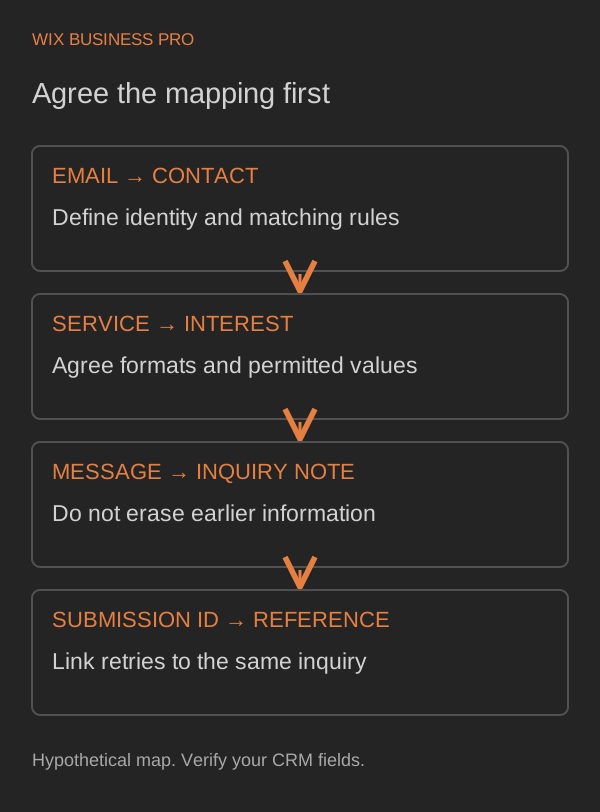
For each field, document its destination, format, permitted values, required status and update behavior. Keep the original submission identifier so a retry can be linked to the same inquiry. Treat submission time and CRM delivery time separately.
Preserve source context only where it is useful and permitted. Do not silently replace an existing contact's original source with the latest form visit. Agree whether you need first source, latest inquiry source, or both, and explain what those fields mean.
Choose the simplest connection that handles your exceptions
| Approach | Good fit | Check before choosing |
|---|---|---|
| Native connector | A supported form and CRM with straightforward mapping | Update behavior, routing, error visibility and available fields |
| No code workflow | Several supported tools with manageable rules | Task limits, retries, credential ownership and exception handling |
| Custom integration | Specific data rules, unsupported operations or complex ownership | API access, maintenance, monitoring and documented recovery |
A native connector is worth testing first. A custom integration is justified when important requirements cannot be met reliably by the simpler route, not because custom code sounds more impressive. Subscription and API restrictions can change the choice.
Our existing no code lead pipeline article covers the broader pipeline approach. This guide goes deeper into the website to CRM boundary, where matching, delivery and recovery need specific decisions.
Expect failures and design a recovery path
Credentials expire. Providers limit requests. A CRM may accept a record even when your website receives no clear response. Blindly sending the same create request again can produce duplicates or conflicting actions.
Agree where accepted submissions are retained, how delivery status is recorded and how long pending work can remain unresolved. Use a stable identifier and verify whether the destination supports an operation that can safely be repeated. Do not promise exactly once delivery without proving how both systems support it.
The HubSpot error handling documentation distinguishes authentication and permission failures and describes partial outcomes for supported batch operations. A retry is not the answer to every failure. Missing permission needs correction; an uncertain delivery needs investigation before another create.
The team needs a visible exception queue, an alert owner and a controlled replay process. Record enough technical context to diagnose failure without placing entire private inquiry messages in general purpose logs. Test recovery with sample data before launch.
Handle access, spam and consent deliberately
Private API credentials belong on the server, not in website code delivered to visitors. Give the integration only the access its operations require. Establish who owns the connection and what happens when that person leaves.
HubSpot's scope documentation explains how permissions correspond to operations and account data. Its OAuth guidance covers account authorization and token based access. Whether OAuth or another supported mechanism fits depends on the app and installation model; verify the provider's current requirements.
Submission to an inquiry form is not automatically permission for unrelated marketing. Separate answering the request from newsletter enrollment, and retain consent evidence when marketing consent is collected. Legal requirements depend on your jurisdiction and use of the information, so review the process with an appropriate adviser.
Also define retention and deletion responsibilities across the website, CRM, workflow tool and backups. Connecting systems should not create unnoticed copies of personal information.
Count inquiries without counting them twice
Distinguish accepted submissions, CRM records and qualified inquiries. A spam entry can be saved without being qualified. A contact can already exist while a new inquiry is genuine. Neither a button click nor a CRM retry should become another website conversion.
Choose one authoritative success boundary for website lead measurement, such as successful durable saving of a validated inquiry. CRM creation, assignment and follow up can be measured separately. Tie delivery attempts to the original submission rather than generating a new conversion for every attempt.
Track missing CRM outcomes, unassigned inquiries and time to the first meaningful human response. Define qualification with your team. A useful report explains what happened to inquiries, rather than presenting a growing contact count as proof of sales.
What to ask a developer before hiring
- Which form and CRM operations are supported by our current subscriptions?
- How will you match existing contacts without losing separate inquiries?
- What mapping and blank field update rules will we approve?
- Where is an accepted inquiry kept if the CRM is unavailable?
- How will timeouts, partial success and duplicate delivery be handled?
- Who sees failed or unassigned inquiries, and who can replay them?
- Which permissions are needed, and who owns credential renewal?
- How will spam, consent and retention work across the connected tools?
- What test evidence and operating instructions will we receive?
- What ongoing monitoring and maintenance are included or separately scoped?
Ask for tests covering a new contact, an existing contact, repeated submission, rejected input, revoked access and a provider timeout. Use clearly identified test records. A demonstration where one form creates one contact is a start, not a reliability assessment.
Make the next inquiry easier to follow
The practical takeaway is simple: connect the entire handoff and make exceptions visible. Your team should be able to explain where an inquiry is, who owns it and what happens next.
For help with routing and follow up, explore business automation. For website and API work, see web development. If you want to discuss CRM integration services, tell us which form and CRM you use and where the process breaks. A short description is enough; the integration will be scoped around the actual requirements.