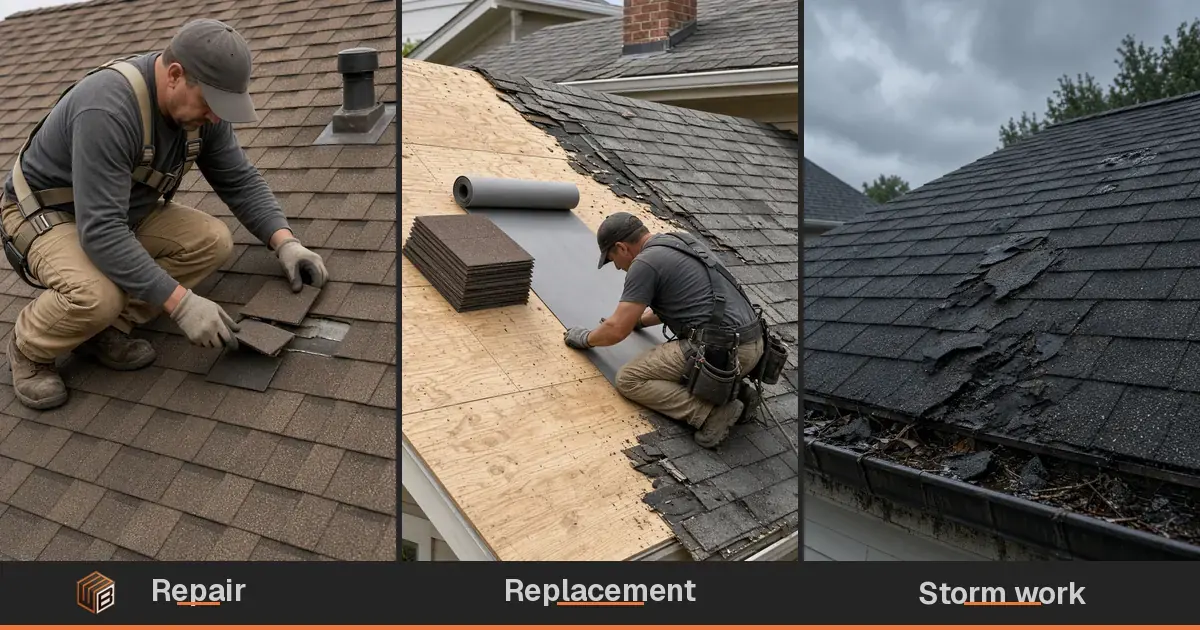
The morning after a hailstorm, a crew nobody in town has heard of starts knocking on doors. They have a clipboard and a "free inspection" offer. Some homeowners will sign on the spot. Others will close the door, pull out a phone, and look up a local roofer first. (A typical scenario, not a real client or town.)
That second homeowner is who your roofing website design is for. In the next minute they're checking three things. Do you fix roofs like theirs? Are you local, and can they verify it? Can they ask you to come look without waiting on hold? A good roofing site answers those on the first screen. Then it backs them up with a separate page for each kind of roof work and real photos of roofs you've done.
Below is the plan we'd use, one page at a time. It's written for a local crew, not a national roofing company. For the checklist that applies to every trade, see our post on contractor website design.
The plan at a glance
| Page | The homeowner's question | What it needs |
|---|---|---|
| Home screen | "Can this roofer help me?" | Repair, replacement, and storm work named, your towns, a call button, an inspection button |
| Roof repair | "Is this a small fix?" | Common repairs you take, what happens at the visit, photos |
| Roof replacement | "What goes into a new roof?" | Materials you install, what affects the estimate, before-and-after photos |
| Storm damage | "What do I do now?" | First steps, how your inspection works, plain insurance wording |
| Photos | "Is their work any good?" | Your roofs, labeled with material and town |
| About and areas | "Are they real and local?" | License and insurance details, towns served, hours |
| Inspection request | "How do I get someone out here?" | A short form with photo upload and tap-to-call |
Seven pages. Most small crews can launch with all of them. Skip the storm page if you don't do storm work.
Page 1. The home screen
On a phone, the top of your home page has to name the work and the place. "Roof repair, replacement and storm inspections in [your county]" does that. "Excellence in roofing since day one" doesn't. Neither does a drone video that loads for five seconds.
Under the headline, put one thing a homeowner can check. That could be your license and insurance details, a review rating linked to where it came from, or a photo of your crew on an actual job. Then two buttons: call, and request an inspection. Both should show without scrolling.
Keep pop-ups and cookie banners off the phone number. Google's page experience guidance also asks site owners to avoid intrusive interstitials. And leave out countdown timers or "storm special, act now" banners. After a storm, that's exactly how the door-knockers sound.
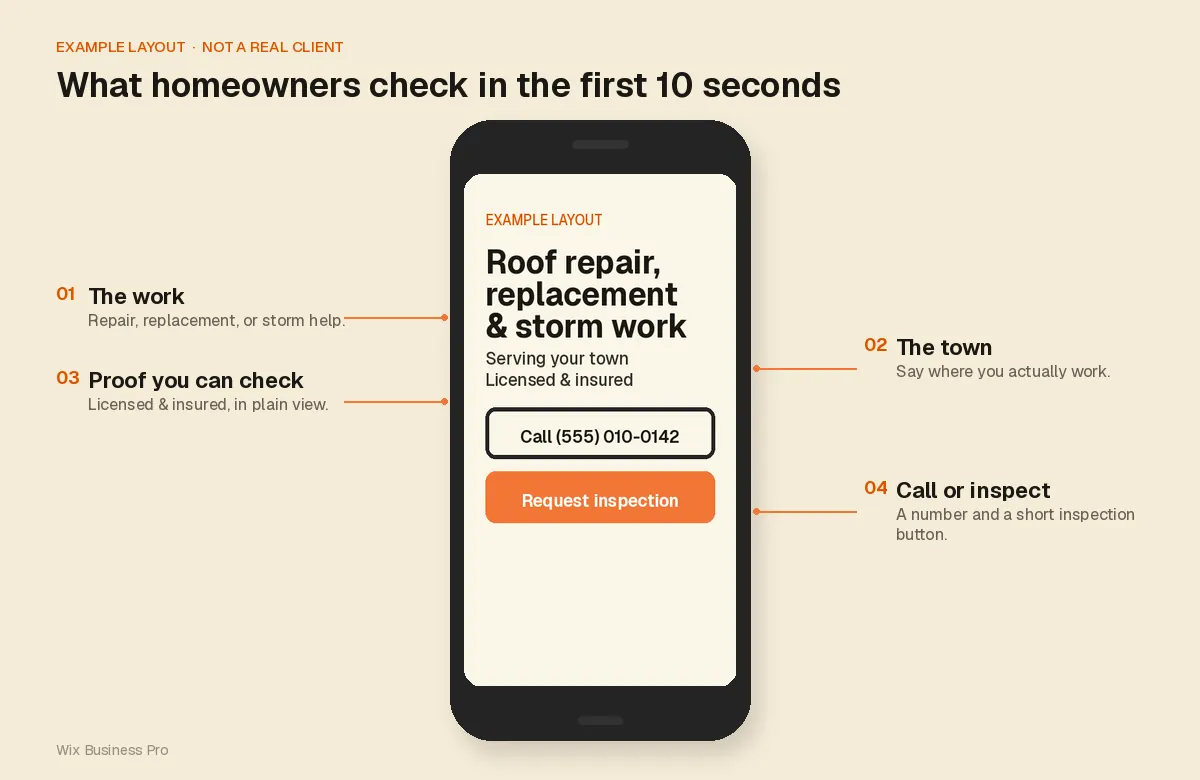
Example layout, not a real client. Four things to make obvious on the first screen: the work, the towns, one proof point, and a way to call or request an inspection.
Page 2. Roof repair
Someone with a missing shingle or a leak around a vent pipe wants to know if it's a small job. Tell them which repairs you take: leaks, flashing, missing or damaged shingles, whatever you actually do. Then explain what happens at the visit. Do you go up and look? Send photos afterward? Give a written estimate?
A repair visit and a replacement visit are different jobs. The repair page should read like a smaller visit, not a pitch for a new roof. If you have a minimum job size, or you don't do certain repairs, say so here. It saves you calls you'd turn down anyway.
Page 3. Roof replacement
Replacement is a bigger decision, and people read more before they call. Don't copy the repair page and swap a few words. Someone here is choosing a system that has to last, not asking whether a leak can be patched this week. List the materials you really install, like asphalt shingles, metal, or flat roofing.
Explain what moves the estimate, in plain words: the size and pitch of the roof, the material, how many old layers come off, and how easy it is to get to. You don't need a price list. A homeowner who understands why two quotes differ is easier to talk to.
Before-and-after photos earn their place on this page more than anywhere else.
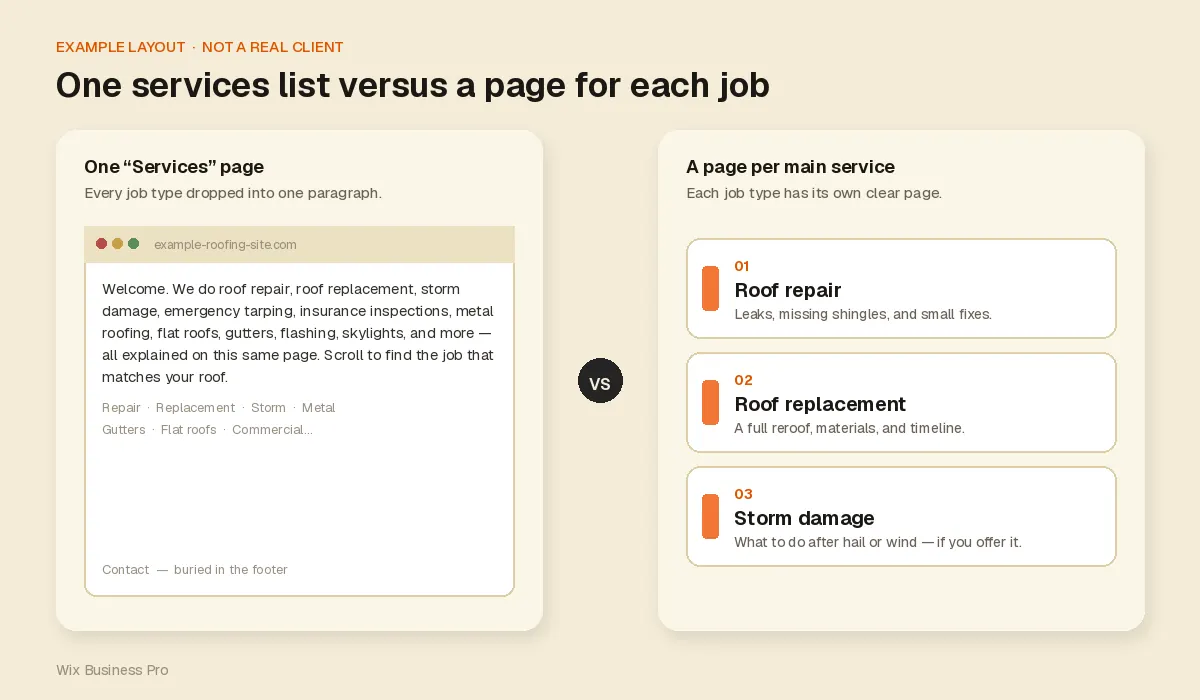
Example layout, not a real client. One services list versus a page per main job.
Page 4. Storm damage (only if you do storm work)
Write this page in a quiet month. After hail or high wind, you'll be on roofs, and the page needs to be ready.
Start with what the homeowner can do right now. They can take photos from the ground and inside the house. If you offer emergency tarping, say how to ask for it. Next, explain your inspection. You go up, document what you find, and give an estimate the homeowner can use when they talk to their insurer.
Then the hard part: insurance wording. Keep it to what you actually do. Avoid lines like "we'll handle your claim" or "we work with your insurer so you pay nothing." Don't promise to file, adjust, or negotiate a claim, or to cover a deductible. Rules on what a contractor can say and do vary by US state and Canadian province. This post isn't legal or insurance advice. Have someone who knows the rules where you work read this page before it goes live.
Page 5. Your roofs, in photos
A gallery of unlabeled drone shots says "we have a drone." What works better is the same angle before and after, with a short caption: "Asphalt shingle replacement, [town]." Now the homeowner knows the material, the job, and that you work near them.
Short on photos? Show the process: tear-off, underlayment, the cleanup at the end. Older jobs count if you label them honestly. Ask your next few customers if you can shoot their roof. And never borrow someone else's work.
Page 6. Who you are and where you work
This is where a careful homeowner checks that you're real. Show the people behind the business. Add license and insurance details in whatever form your state or province requires, and manufacturer certifications or warranties only if they exist and can be checked.
List your service area the way locals say it, by towns or counties. Google's help on service areas explains how to set those on your Business Profile by city or postal code. Keep the website's list the same. Add your hours, and what happens when someone writes in at night or right after a storm.
Page 7. The inspection request
Picture someone standing in the driveway, looking up at a lifted shingle. Your form should be easy to finish right there. Ask for:
- the job type (repair, replacement, or storm)
- town or ZIP code
- phone number
- an optional photo of the damage
Keep the tap-to-call bar on screen while they type, because some people with water coming in would rather talk. After they hit send, tell them what happens next, for example "We'll call you to set up a time." Then make sure someone does.
If you add an assistant or chat tool, be clear about its limits. The AI customer assistant in our Smart Website answers questions you approve, collects the job details, and passes them to you. It doesn't answer phone calls, quote prices, promise availability, or book jobs unless you tell us exactly how to handle that.
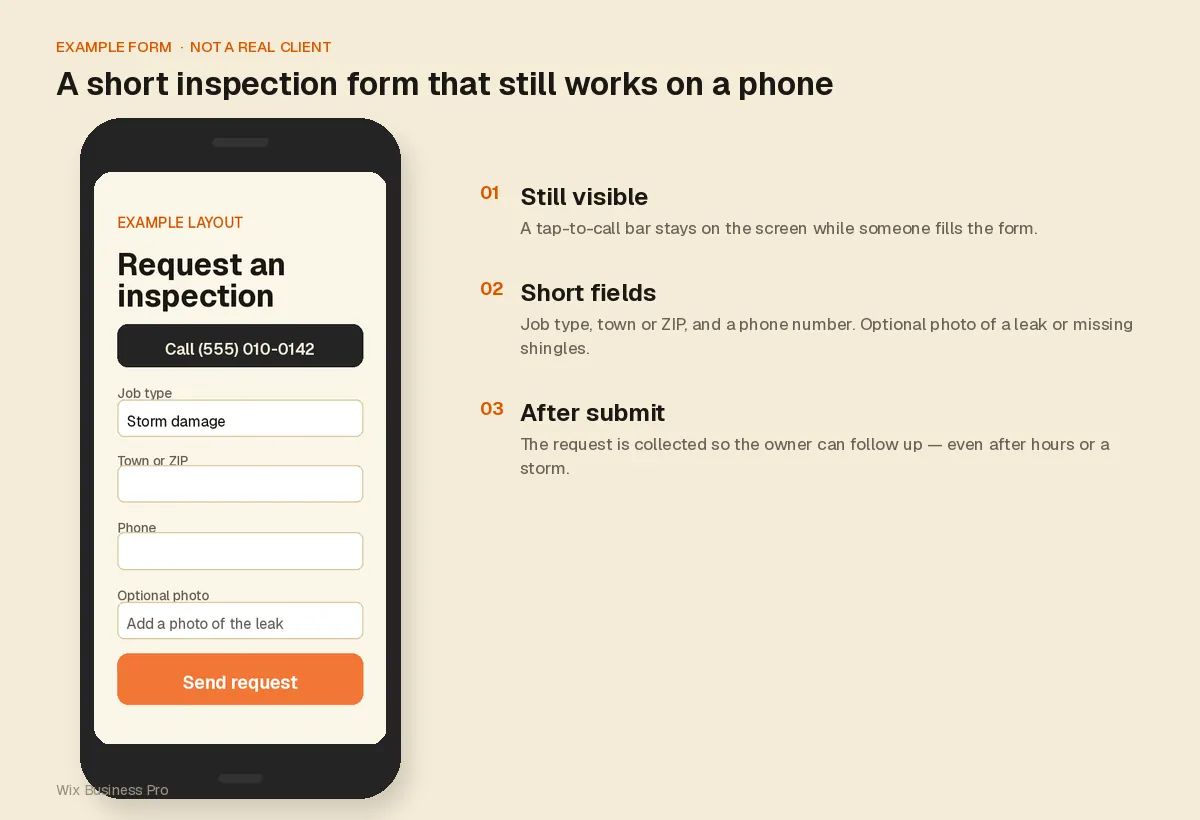
Example form, not a real client. Short fields, optional photo, tap-to-call still visible.
Leave these off for now
- A slider on the home page. Most of the slider is never seen.
- Stock photos of roofs you didn't build.
- "Best roofer in [city]" with nothing behind it.
- A contact form that only lives in the footer.
- Claim promises you can't legally make.
- A blog, financing page, or resources section before the seven pages above are solid. Add financing only if you offer it, and only in wording you're allowed to use.
Google's SEO Starter Guide says there are no secrets that automatically rank a site first. Useful pages come first.
If you'd rather hand it off
Roofers are one of the trades our Smart Website for contractors is built for. It includes service pages, a project portfolio, smart estimate forms, and an AI assistant that answers the questions you approve. Per the live offer page, checked November 23, 2026: $599 paid in full, or 2 payments of $349 ($698 total). It's ready one week after we receive your completed onboarding form. The first year of hosting is included. After that, it's $250 a year for eligible custom-coded sites, only if you authorize it. Foundational SEO is included. Ongoing SEO is optional and billed separately (Contractor Local $95/month, Contractor Growth $180/month). Ad campaigns and ad spend aren't included. All amounts are in US dollars. Three-year costs are in our contractor website cost guide.
We can't promise rankings or a number of jobs. What a clear site does is make it easier for a homeowner who's already looking to ask you to come out.
A quick check on your current roofing site
Grab your phone and open your own site, as a stranger would.
- Can you tell, without scrolling, that you do repair, replacement, or storm work, and where?
- Tap the phone number. Does it dial?
- Do repair and replacement have their own pages?
- Are your license and insurance details easy to find?
- Send yourself an inspection request with a photo attached. Did it arrive?
If you're also working on how homeowners find you in the first place, our guide to getting more contractor leads covers the bigger picture.
Want a roofing site that takes inspection requests while you're up a ladder?
Review the demo and all the terms before you commit. Websites and SEO since 2013. Wix Partner since 2018.
See the $599 Smart Website · Questions first? Talk to our team.
Sources
Reviewed on November 23, 2026. Package details come from our live offer page that day; prices can change.
- Google Search Central: SEO Starter Guide.
- Google Search Central: Understanding page experience.
- Google Business Profile Help: Manage your service areas.
- Wix Help Center: Getting your site found on Google: SEO best practices.
- Wix Business Pro: Smart Websites for Contractors. Package, prices, hosting, assistant limits.
Roofers ask us
Is a roofing website different from any other contractor site?
The basics are the same, but roofing adds three things: separate repair and replacement pages, a storm page if you do that work, and an inspection request that accepts photos.
I only do repairs. Do I still need several pages?
Fewer, yes. A home screen, one repair page that lists the jobs you take, photos, an about page with your towns, and the inspection request can be enough.
Can I mention insurance on my site?
You can explain what you do, such as inspecting, documenting damage, and writing an estimate. Don't promise to handle or negotiate a claim or cover a deductible, and have the wording checked for your state or province.
How does a website help against out-of-town storm crews?
It can't stop door-knocking. It gives a homeowner who looks you up a way to check that you're local, licensed, and insured, and to ask you for an inspection instead.
My best jobs were years ago. Can I still post them?
Yes, if they're your work and the captions are honest about the job. Add new photos as you finish jobs.
Do I need a blog on a roofing site?
Not to start. Get the core pages and the inspection request right first. A blog can come later.
What would a roofing site cost with you?
Our Smart Contractor Website is $599 paid in full, per our live offer page on November 23, 2026. Other ways to build one, and three-year costs, are in our contractor website cost guide.