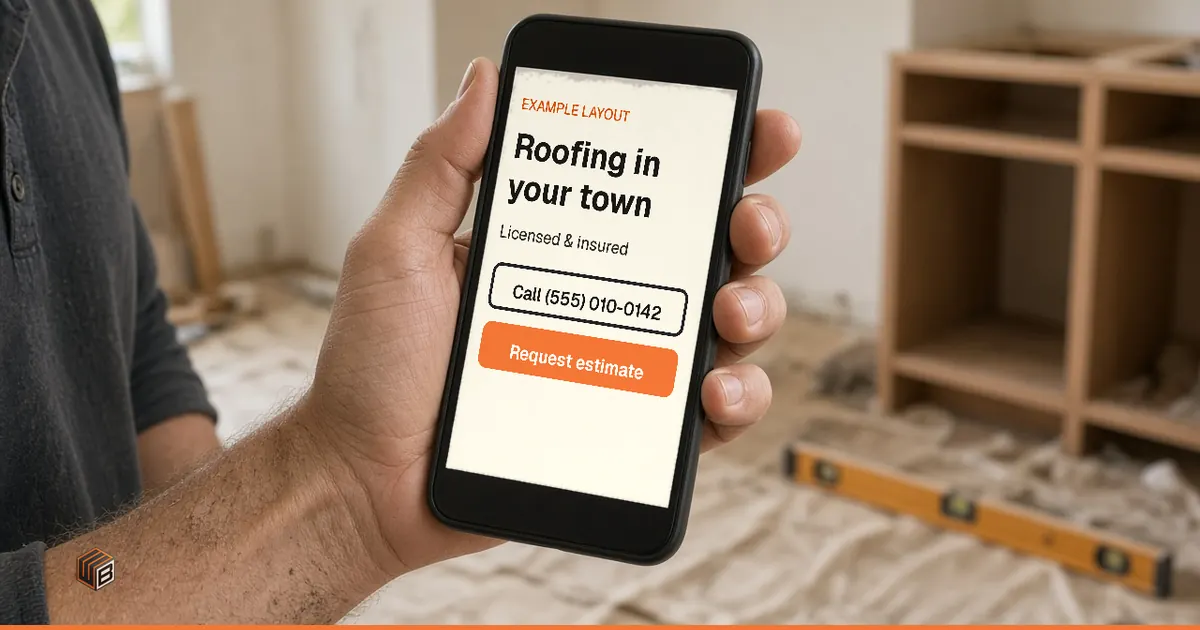
The short answer: good contractor website design makes four things obvious on a phone screen: what you do, where you work, why a homeowner can trust you, and how to call or request an estimate. Service pages, real job photos, license and insurance details, and a short estimate form back them up. Sliders and long welcome messages don't.
Here's a hypothetical example, not a real client, town, or job. Say a storm rolled through last night. A homeowner has a drip in the upstairs bedroom and three roofing websites open on a phone. You're on someone else's roof and can't answer. One site says "Roof repair in Springfield" with a phone button. Another opens with a pop-up. The third has a slider of sunsets. You can guess which one gets the estimate request.
This guide covers the first screen, the pages you need, the proof homeowners look for, the estimate form, and what to skip.
Four things to know before you build or redo your site
- The first screen on a phone matters most.
- One page per main service beats one long "Services" list.
- Real job photos and checkable credentials beat any slogan.
- A website helps people who find you get in touch. It doesn't bring in jobs on its own.
What should a contractor website include?
A contractor website needs a clear first screen, real proof, one page per main service, your service area, and an easy way to reach you. That's the useful short list. You don't need a 40-page brochure.
- First screen. Your trade, your service area, a tap-to-call number, and one button to request an estimate or inspection.
- Real job photos. Your crew, your trucks, your finished work. Not stock photos that could belong to anyone.
- Credentials a homeowner can check. License and insurance details, as your state or province requires.
- Reviews from a real source. Genuine reviews or a link to your Google Business Profile. Never fake stars.
- A page per main service. Roof repair and roof replacement are different jobs, so they get different pages.
- Your service area in plain words. The towns and neighborhoods people actually say, not just a map pin.
- A short estimate form that works on a phone. It should still take requests at 9 p.m. on a Sunday.
- Contact paths that work while you're on a job. A form, a call or text link, and when you'll reply.
What do homeowners check in the first 10 seconds?
On a phone, a homeowner answers four quick questions before deciding to scroll, call, or leave. Your first screen should answer all four.
- Can you do this job? Name the trade in the headline. "Roof repair and replacement" works. "Welcome to our website" doesn't.
- Do you work in my town? Put the main towns or the county right under the headline.
- Can I trust you? Show one thing they can check: "Licensed and insured" with details on the page, a review rating linked to its source, or a real photo of your crew.
- Can I call or ask for an estimate without hunting? A tap-to-call button and one estimate button, both visible without scrolling.
What to skip on that first screen:
- Rotating sliders. They move before people finish reading and add weight to the page.
- Pop-ups on arrival. They cover the phone number. Google's page experience guidance also asks sites to avoid intrusive interstitials.
- Autoplay video. It eats data and attention before the visitor knows what you do.
- A headline with no trade or town. Save clever lines for further down.
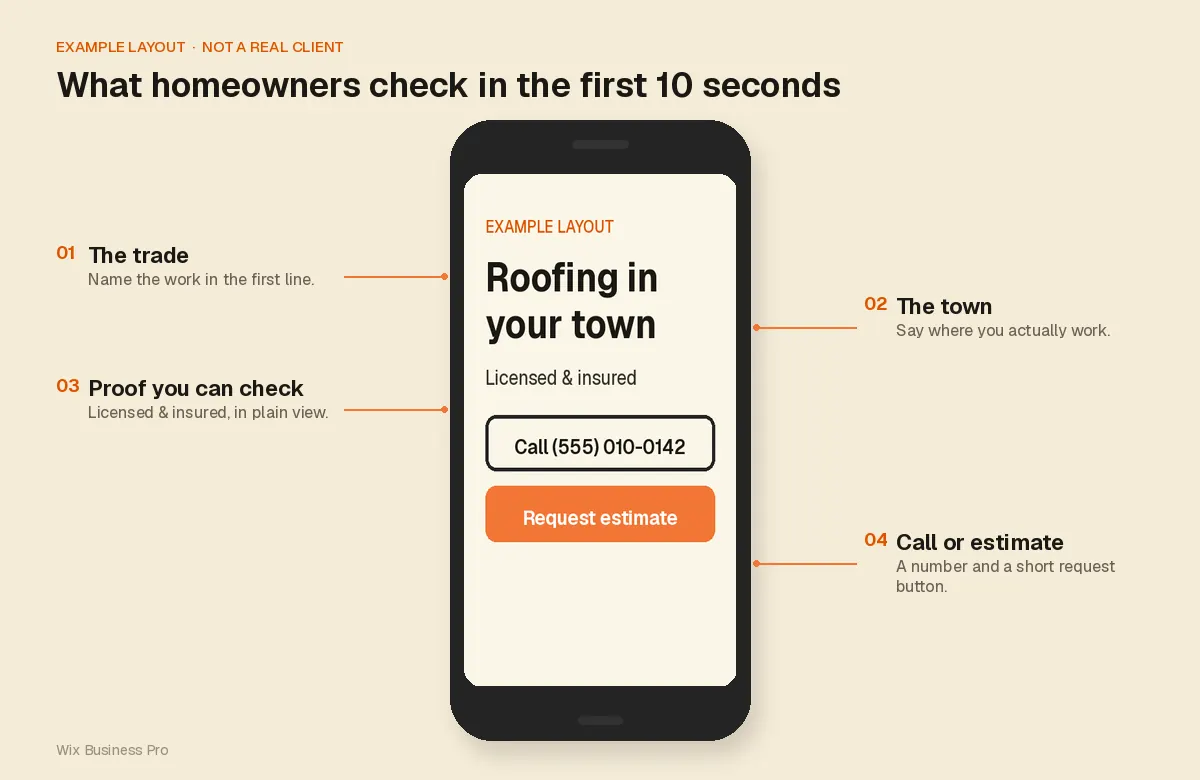
Example layout, not a real client. Four things homeowners check on the first screen.
Which pages does a contractor website actually need?
Most small trade businesses need five types of pages: home, one page per main service, a work or projects page, an about page with areas served, and contact. A few more can wait.
Home
The first screen plus a short tour: main services, a few strong job photos, your area, proof, and the estimate button again near the bottom. It sends people to the right service page or to contact you.
Service pages (one per main service)
Give each main service its own page. A single "Services" page that lists everything in one paragraph makes a homeowner work to find their job. It also gives search engines one vague page instead of several clear ones.
Split by the jobs people ask for: roof repair vs. roof replacement, or emergency plumbing vs. water heater installation. Each page should say what the job involves, where you do it, show a few photos of that work, and explain how to request an estimate. Write it the way you'd explain the job on the driveway, without repeating the keyword in every sentence. Wix's own SEO best practices guide covers the basics if you build on Wix.
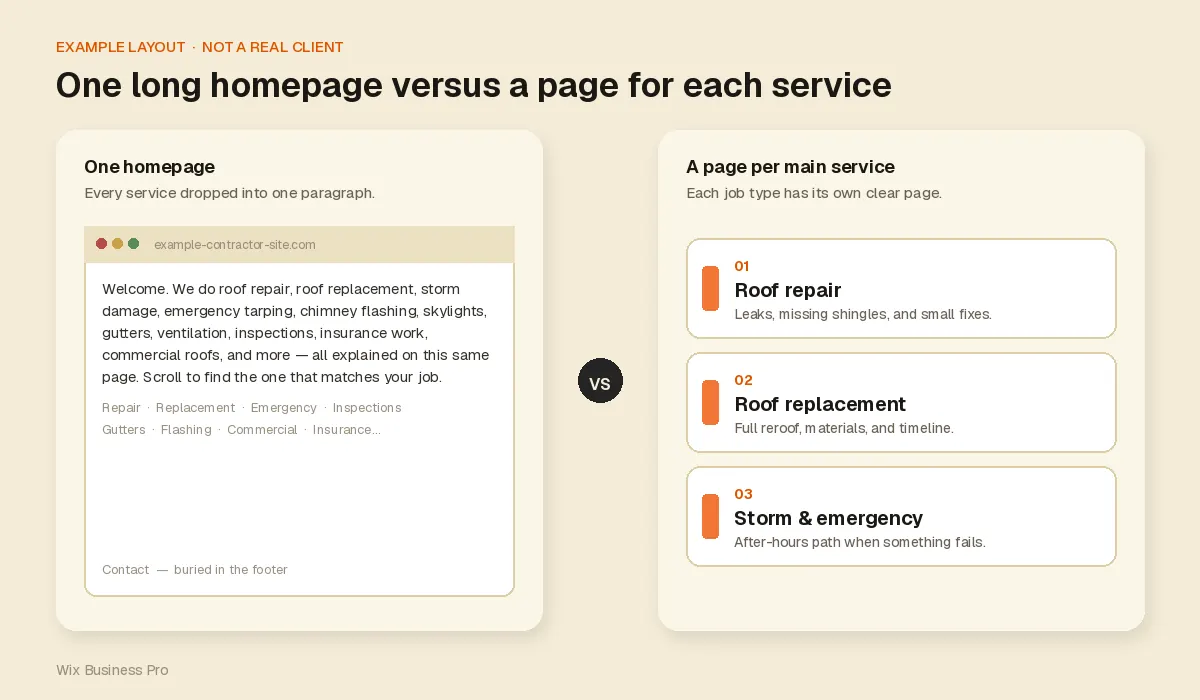
Example layout, not a real client. One homepage versus a page per main service.
Work and project photos
If you have lots of photos, pick the jobs you want more of and label each with the job type and town. Before-and-after pairs work well.
If you don't have many yet, don't fake it. Never use photos of someone else's work. Instead:
- Show your process: a tarp going on, a clean job site, the crew loading the truck.
- Use older jobs you're still proud of, labeled honestly.
- Show reviews next to the photos you do have.
- Ask your next three customers if you can photograph the job before and after.
About, areas served, and contact
Your about page should say who's behind the business and show license and insurance details. Rules differ by state and province, so show what your jurisdiction requires (this isn't legal advice).
List your service area in the words people use: towns, counties, or "the North Shore." Google's overview for service businesses calls a business that travels to customers a service-area business, with a plumber as its example. Keep that area the same on your site and your Business Profile.
On the contact page, give your hours and say what happens after hours, for example "Send the form tonight and we'll call you the next business morning." Only if it's true.
Pages you can wait on
A blog, careers page, or big "resources" section can wait. Don't let them push the estimate button off the first screen.
How should the estimate form work?
Keep the estimate form short enough to finish with one thumb, and keep the call button visible while people fill it in.
- Ask only what you need first: job type, town or ZIP code, phone number, and optional photos. Get the rest on the call.
- Keep tap-to-call visible. Some people would rather talk. Let them.
- Say what happens after submit. For example: "We'll call you to set up a visit." Then make sure it happens.
- Let it work after hours. The form collects requests while you're asleep or on a job, so you can follow up first thing.
If you add an assistant or chat tool, be clear about its limits. Our Smart Website, for example, includes estimate request forms and an AI customer assistant that answers questions you approve, collects the job details, and passes them to you. It doesn't answer phone calls, quote prices, promise availability, or book jobs unless you tell us exactly how to handle that. Prices and dates should come from you.
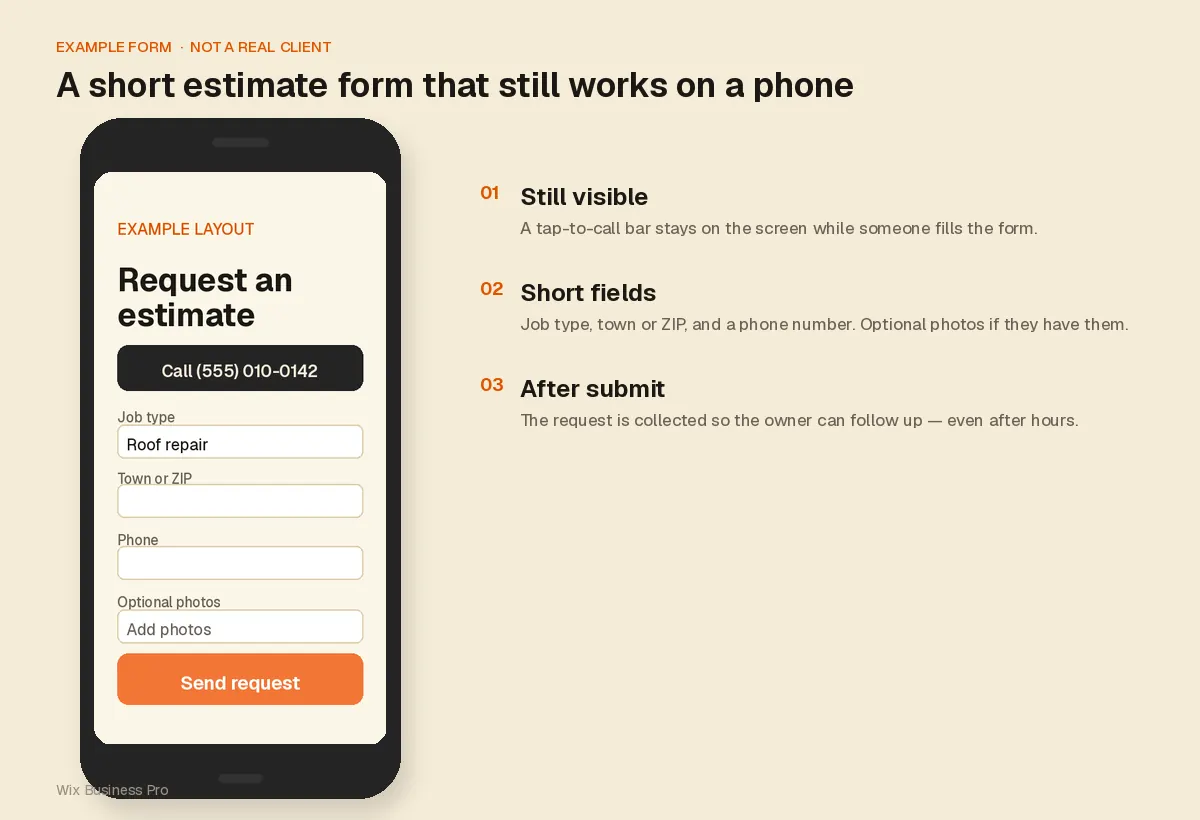
Example form, not a real client. Short fields, with the tap-to-call bar still visible.
What changes by trade?
The structure stays the same. What goes on the first screen and in the form changes with the work.
- Roofers. Separate repair, replacement, and storm-damage pages. If you handle insurance claims, explain how in plain terms.
- Plumbers and HVAC. An emergency path with the phone number up front, and a planned-work path (water heaters, replacements, maintenance) with the form.
- Electricians. Make your license easy to find. Split emergency calls from planned upgrades like panels or EV chargers.
- Landscapers. Before-and-after photos carry the page, then one clear next step. See our landscaping web design page.
- General contractors and remodelers. Organize by project type, explain your process, and use a longer form that asks about scope and timing.
What should you skip?
Anything that hides the phone number or makes you look like someone you're not. On top of the first-screen list above, skip stock-only photos, "best contractor in [city]" with nothing to back it up, a contact form that only lives in the footer, and pages that make a small local crew look like a national firm. Homeowners hiring a three-person crew want to see the three people.
How do you tell a useful contractor website from a pretty one?
A useful site answers the homeowner's questions and makes contact easy. A pretty one just looks nice.
| Area | Pretty but not useful | Useful |
|---|---|---|
| First screen | Slider, slogan, no town | Trade, town, proof, call and estimate buttons |
| Photos | Stock images | Your crew and your finished jobs, labeled |
| Services | One long list | One page per main service |
| Proof | "Quality you can trust" | License and insurance details, real reviews |
| Estimate form | Ten fields, footer only | A few fields, easy to find, works on a phone |
Where we come in
Where we come in: If you'd rather stay on the tools, our Smart Website for contractors is built around this checklist: a first screen made for phones, service pages, a project portfolio, smart estimate forms, and an AI assistant that answers the questions you approve. Per the live offer page on November 21, 2026, it's $599 paid in full, or 2 payments of $349 ($698 total). The site is ready one week after we receive your completed onboarding form. The first year of hosting is included, then $250 per year for eligible custom-coded sites, only if you authorize the renewal. Ongoing SEO is optional and billed separately (Contractor Local $95/month, Contractor Growth $180/month). All amounts are in US dollars. Full breakdown: how much a contractor website costs in 2026.
We don't promise rankings or a set number of leads. A clear site makes it easier for people who find you to get in touch. How many you get depends on your market, your reviews, and how people find you.
What to do this week if your site is already live
Open your site on your phone and work through this list. It takes about an hour.
- First screen. Can a stranger tell your trade and town without scrolling?
- Tap-to-call. Tap the number. Does it dial?
- Photos. Swap stock photos for real job photos, even phone shots.
- Service pages. If all services share one page, give your top two their own.
- Proof. Add license and insurance details; link reviews to their source.
- Form test. Send yourself an estimate request from your phone. Did it arrive?
Your website works alongside your Google Business Profile, not instead of it. Google's tips to improve your local ranking start with complete, accurate information, reviews, and photos. For the bigger picture, read how contractors get more leads and grow.
A website that takes estimate requests while you work
Review the demo and all the terms before you commit. Websites and SEO since 2013. Wix Partner since 2018.
Explore the $599 Smart Website · Prefer to ask first? Talk to our team.
Sources
Reviewed on November 21, 2026. Package details come from our live offer page that day; prices can change.
- Google Search Central: Understanding page experience.
- Google Business Profile Help: Business Profile for service businesses overview.
- Google Business Profile Help: Tips to improve your local ranking on Google.
- Wix Help Center: Getting your site found on Google: SEO best practices.
- Wix Business Pro: Smart Websites for Contractors. Package, prices, hosting, assistant limits.
Frequently asked questions
What should a contractor website include?
A first screen with your trade, service area, tap-to-call number, and estimate button, plus one page per main service, real job photos, license and insurance details, genuine reviews, and a short phone-friendly estimate form.
Do contractors still need a website if they have a Google Business Profile?
Yes. The profile helps people find you on Google Search and Maps. The website is where you explain each service, show your work in detail, and collect estimate requests.
How many service pages does a contractor website need?
One for each main job you want more of. Start with your top two or three services and add more as you go.
What if I don't have many project photos yet?
Use what's real: process shots, your crew and trucks, older jobs, and reviews. Ask your next few customers if you can photograph their job. Never use someone else's work.
Should the estimate form be on every page?
The estimate button should be on every page, top and bottom. The form itself can live on one page, as long as it's one tap away.
Can a Wix site work for a contractor?
Yes. Wix lets you edit page titles, headings, text, and image alt text. What matters most is the content: clear service pages, real photos, and an easy way to reach you.
How much does a contractor website cost?
It depends on who builds it and what it must do. Our Smart Contractor Website is $599 paid in full (live offer page, November 21, 2026). For DIY, freelancer, and agency ranges, read our contractor website cost guide.