You want customers to stop asking where their files are, whether their project is ready, and who needs to approve the next step. A portal sounds like the answer. Then you ask what it costs and get estimates that seem to describe entirely different products.
They probably do. Client portal development cost depends on the work behind the login screen: permissions, customer records, staff workflows, documents and connections to other systems. There is no honest universal price for that combination. A useful estimate defines what will be built, what is excluded, and what it will take to keep it running.
This guide helps you prepare that scope, compare buying with building, and ask for a quote you can actually evaluate. It is budgeting guidance, not a Wix Business Pro price list or a promise that a portal fits a standard website package.
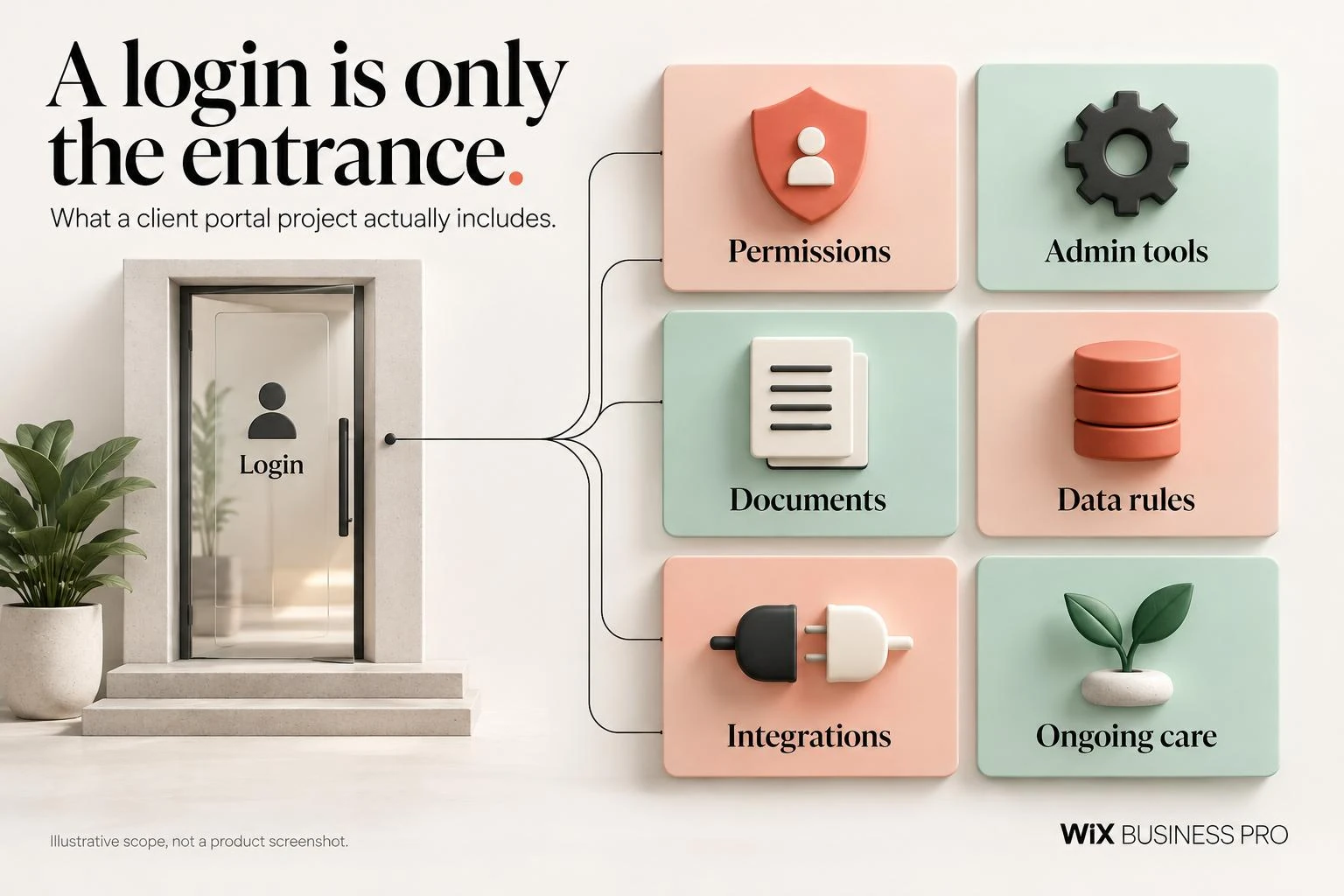
The login screen is the small part
A tidy sign in page is easy to picture. The harder question is what each person can do after entering it. Can two employees at a customer company see the same project? Can a contractor see one document but not another? Who removes access when someone leaves?
Those decisions affect the data structure, administrative tools and testing. A staff member needs to invite people, correct mistakes, change a project stage and investigate an access problem. If the quote covers only customer screens, ask where that work happens.
Turn a feature list into a usable scope
Start with one customer journey
Write what happens from invitation to completion. For example: a customer accepts an invitation, sees an assigned project, downloads a document, requests a correction and approves the final version. Describe the staff actions alongside it. This reveals dependencies that a list reading “login, files, dashboard” leaves hidden.
Define roles and boundaries
List customers, customer managers, staff, administrators and any outside collaborators. For each role, specify which records they may view, create, edit, approve or delete. Decide whether access belongs to a person, an organization or a project. These models are not interchangeable.
The OWASP guidance on object level authorization explains why a system must check access to individual records. Hiding a button or changing a document address is not an access control strategy.
Name the source of every important record
Will the portal own project data, read it from a CRM, or combine several systems? Who resolves conflicts if staff change the same information in two places? Existing spreadsheets may need cleanup before migration. A connection may depend on API access that your current subscription does not include.
Ask the developer to verify those dependencies before committing to a fixed scope. A proposed integration is not the same as confirmed access to the required records and operations.
What makes one portal more expensive than another?
- Permission complexity. Different organizations, teams and document restrictions create more access rules and more cases to test.
- The administrative side. Invitations, account recovery, corrections, approval history and reporting need deliberate tools.
- Document handling. File size limits, version history, retention, download permissions and sensitive material change the work.
- Connections. API availability, authentication, rate limits and failure recovery matter more than the number of logos on a proposal.
- Migration. Inconsistent customer names, duplicate records and incomplete ownership information require decisions, not just an import button.
- Approval rules. Multiple approvers, deadlines, revision cycles and disputed decisions need clear behavior.
- Assurance requirements. Accessibility, security review, backups and recovery testing must be scoped rather than assumed.
- Operational ownership. Training, documentation, support and responsibility for future changes affect the overall budget.
Ask for a proposal that connects these factors to deliverables. “Secure client portal” is a description, not an acceptance criterion. “Customer A cannot access Customer B's files through either the interface or a direct request” is something a team can test.
When buying a portal is the better decision
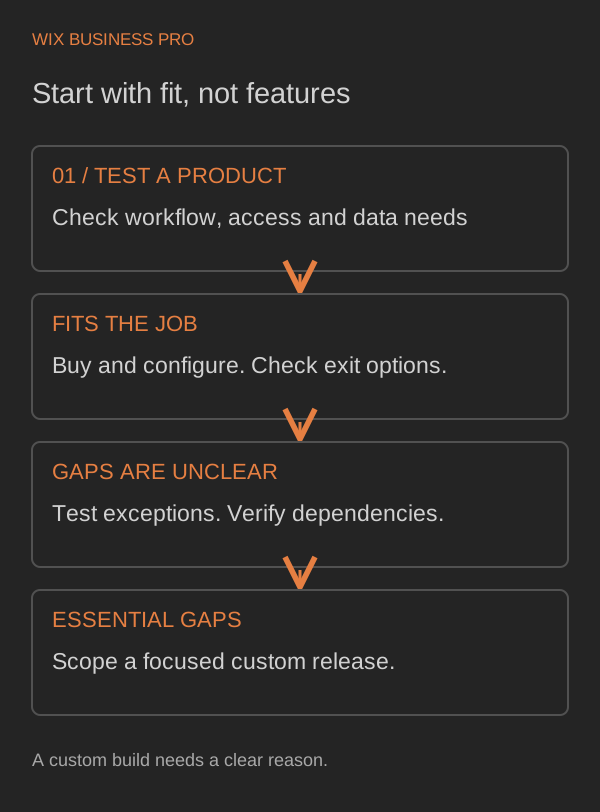
A ready made portal may be the sensible choice when your workflow matches its existing model. You get a product that already has account management and staff tools, rather than commissioning them from scratch. That does not remove the need to check permissions, data exports and ongoing subscription terms.
Test the awkward parts during a trial: an employee leaving, a rejected approval, a customer belonging to two projects, and a document shared with the wrong group. If these ordinary exceptions require workarounds, include the manual effort in your comparison.
| Decision point | Buying may fit | Custom work may fit |
|---|---|---|
| Customer journey | The existing workflow works without compromise | The workflow is specific and materially different |
| Permissions | Standard account and team roles are enough | Access depends on projects, records or unusual relationships |
| Data connections | Supported connectors cover the required operations | Essential systems need a tailored connection |
| Ownership | Product terms and export options are acceptable | You need explicit control of code, data and operating arrangements |
Custom is not automatically better. It carries responsibility for maintenance and decisions that a product vendor would otherwise make. A client portal development company should help you test both routes before recommending a build.
Separate the build budget from the running budget
The initial project may include discovery, design, development, migration and launch testing. Ask whether staff training and documentation are included. Ask what happens if an external API turns out to lack a required capability.
The running budget is different: hosting, storage, subscriptions, monitoring, support, security updates and changes to connected services. Some costs vary with users or file volume. Others depend on how much support and new development you request.
Ask for these costs separately, with assumptions and review points. Establish who owns the source code, who controls hosting accounts and how you would move the system to another provider. A low initial quote can be a poor comparison if these responsibilities remain undefined.
A small first release, explained honestly
Hypothetical example, not a client case: a consultancy wants customers to see project status and approve a final document. Its first release could include invitations, one customer role, one staff role, assigned projects, a single current document and an approval record.
That release would deliberately exclude billing, chat, multiple approval chains, a mobile app and CRM synchronization. Staff would update project stages inside the portal. Customers would approve or request a revision, with the decision attached to the correct project and document version.
Before launch, the team would test access between customers, expired invitations, account removal, incorrect uploads and repeated approval clicks. It would agree how to restore records and who responds when something fails. “Small” should mean fewer supported workflows, not missing safeguards.
A later phase could connect the CRM after the first workflow is understood. Each phase needs its own acceptance criteria and estimate. No price or delivery timeline is implied by this example.
Ask these questions before accepting a quote
- Which customer and staff journeys are included, from start to finish?
- What can each role access, and how will separation between customers be tested?
- What staff tools are included for invitations, corrections and access removal?
- Which system owns each record, and who resolves conflicting updates?
- Have required API capabilities and subscription permissions been checked?
- What document limits, retention rules and backup arrangements apply?
- How are acceptance criteria, defects and new scope distinguished?
- What happens to the estimate when a dependency or requirement changes?
- Who owns code, data, accounts and operating documentation?
- What recurring costs and maintenance responsibilities remain after launch?
- What evidence will show recovery and permission testing were completed?
- How can we export our information and leave the system later?
A scope change process should record the request, its effect on cost and delivery, and your approval before additional work begins. Fixing a defect against an agreed requirement is not the same as adding a new role or integration.
Get a useful estimate without writing a technical brief
Describe who will use the portal, the recurring problem, the systems involved and the first task a customer should complete. Mention any sensitive records or existing contractual requirements. You do not need to design the solution before asking for help.
Our web development service explains the broader development options. If a portal is part of a wider website project, the custom website cost guide provides separate context for website budgeting. Bespoke portal scope still needs its own assessment.
The takeaway: budget for a working customer and staff process, not a collection of screens. If you would like a second look at the scope, send us a short project inquiry. A few sentences about the problem are enough to start a sensible conversation.